Your business depends on reliable technology every day, making software longevity and hardware performance essential for productivity, security, and cost savings. Whether you operate a small business or a large enterprise, maximizing both hardware and software longevity of computers reduces unnecessary replacement costs while helping your organization stay secure. One of the biggest factors affecting long-term performance is the impact of desktop operating systems on hardware longevity. Keeping your systems updated, secure, and properly maintained allows your hardware to operate efficiently for years while reducing the risk of downtime and data breaches.
Below are practical strategies for maintaining a computer system and maintaining hardware so your business can maximize the value of its IT investments.
3 Ways to maintain hardware and extend its lifespan
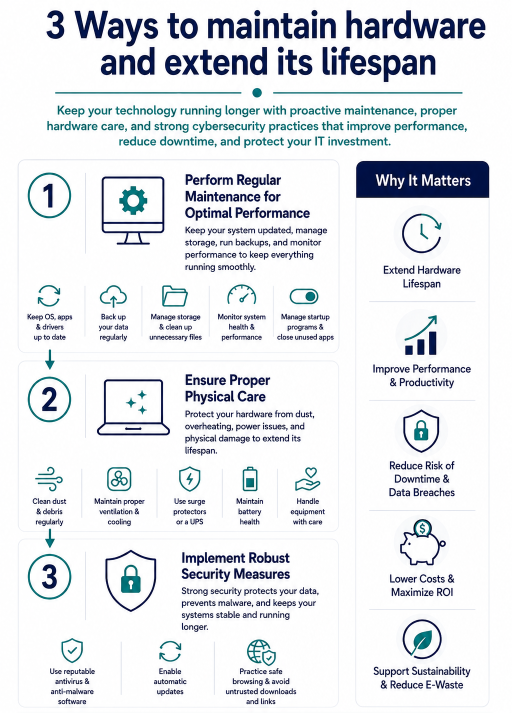
The impact of desktop operating systems on hardware longevity is often overlooked but plays an important role in overall system performance. Here is an infographic that explains the three key ways to maximize hardware and software longevity.
1. Perform regular maintenance for optimal performance
Performing regular maintenance is essential to improve software longevity, maintain hardware, and extend the life of your computer hardware. Start by keeping your operating system and software applications up to date. Regular updates provide important security patches, bug fixes, and performance improvements that help maintain system stability while protecting against vulnerabilities.
Perform regular backups
Regularly back up your data to prevent costly losses caused by hardware failure, ransomware, or accidental deletion. Use secure cloud storage or encrypted external drives to ensure important business files remain protected.
Avoid overloading computers
Running too many programs simultaneously can strain your system, reducing the lifespan of your computer. Review which applications automatically launch when your operating system starts, and disable unnecessary startup programs. Keep in mind that software updates may re-enable certain applications after installation, so it’s worth reviewing your startup settings periodically after installing updates or new software.
Manage storage space
Managing available storage is an important part of maintaining a computer system. Regularly remove temporary files, duplicate data, and unused applications to free up valuable disk space. Built-in disk cleanup utilities can also help identify hidden files that unnecessarily consume storage and slow system performance.
Keep device drivers updated
Device drivers keep your computer hardware functioning properly. Whether your business uses Windows or macOS, regularly updating drivers provides performance improvements, bug fixes, and compatibility enhancements that contribute to better software longevity and help extend the lifespan of your computer hardware.
Install system monitoring software
When used safely, system monitoring software can help you keep an eye on system stability and health. These tools can alert you to potential issues before they become major problems, allowing you to take proactive measures to maintain hardware and extend your computer’s longevity.
However, be careful that any programs downloaded are from a verified and reputable source.
Learn more: IT Hardware Recycling: 5 Signs Your IT Assets Are Outdated and Ready for Hardware Recycling
2. Ensure proper physical care
While software maintenance is important, maintaining hardware through proper physical care is equally essential for maximizing longevity.
Clean dust and debris
Don’t just perform regular maintenance related to files and programs, keep your actual computer clean, too! Dust and debris can clog your computer’s cooling system and other essential hardware components, leading to overheating or failure. Regular cleaning is one of the simplest ways to maintain hardware and prevent premature component failure caused by overheating.
Use compressed air and a microfiber cloth to regularly clean both the exterior and interior of your computer. This helps extend the lifespan of sensitive components such as the CPU, GPU, and fans. Avoid using household vacuum cleaners, as they may generate static electricity capable of damaging sensitive components.
Maintain proper ventilation and cooling
Maintain proper ventilation to prevent hardware damage caused by overheating. Place computers and other components in a well-ventilated area to allow adequate heat dissipation. If you use a laptop computer regularly, consider using a cooling pad to extend the lifespan of its most sensitive components.
Use surge protectors to prevent power surges
Power surges and outages can cause significant damage to hardware components, which can affect the long-term lifespan of your computer. Use surge protectors to safeguard your computer’s components from power surges. You may also want to consider investing in an uninterruptible power supply (UPS) such as a generator. Uninterruptible power supplies provide a backup energy source during power outages, protecting your essential devices from sudden shutdowns that could lead to data loss or hardware damage.
Maintain computer battery health
If your business relies on laptops, pay attention to battery health. Laptop batteries degrade over time, affecting the lifespan of your computer.
To preserve battery performance:
- Avoid leaving laptops plugged in continuously.
- Keep devices cool with proper ventilation (with a cooling pad if possible)
- Use a surge protector to avoid damage from power surges
- Perform regular maintenance by fully charging and discharging the battery periodically
Handle equipment with care
Even well-maintained computers can suffer from accidental physical damage. To keep your computer running smoothly, always handle it with care. Avoid exposing any hardware components to extreme temperatures, moisture, or physical shocks, and seek professional computer repair if you notice cracks, dents, or other damage. Proper maintenance and careful handling are fundamental to how to maintain computer hardware and maximize its lifespan.
3. Implement robust security measures
Strong cybersecurity practices not only protect sensitive data but also contribute to software longevity by keeping systems stable and free from malware.
Install reputable antivirus and anti-malware software
Install reputable antivirus software to protect your computers from potential threats. These programs regularly clean your hard drive, removing malicious software or files that could compromise your data or affect performance. Using antivirus software to keep your computer clean also helps manage storage space by allowing more disk space for important files and performance improvements. Regular scans also help eliminate unwanted files that consume storage and slow your computers over time.
Enable automatic updates (When appropriate)
If recommended by your IT department, ensure your operating system is set to enable automatic software updates. This is especially important because the impact of desktop operating systems on hardware longevity often depends on maintaining compatibility with updated drivers, security patches, and performance enhancements.
Practice safe browsing habits
Employees should exercise caution when downloading files or visiting unfamiliar websites. Practicing safe browsing habits minimizes the risk of exposing your computer hardware to malware and other security threats. Avoid clicking suspicious links, opening unexpected email attachments, or downloading software from untrusted sources. Safe browsing habits significantly reduce the likelihood of malware infections that can damage both software and hardware performance.
Learn more:
What is the Role of Data Destruction in Cybersecurity?
What Should a Company Do After a Data Breach?
Improve software longevity and protect your IT investment
By understanding the impact of desktop operating systems on hardware longevity and prioritizing maintaining a computer system, businesses can reduce downtime, improve productivity, maintain hardware more effectively, and get more value from their technology investments.
At Keystone Technology Management, we help businesses maximize the value of their IT assets through certified IT asset disposition (ITAD), secure data destruction, and electronics recycling services. Whether you’re upgrading aging hardware or retiring outdated systems, our team ensures your sensitive data is destroyed safely while helping you recover value from your retired equipment.
Contact Keystone Technology Management today to learn how our IT asset disposition and data destruction services can support your business while protecting your data and your investment.
Learn more:
IT Asset Lifecycle Management Best Practices: A Guide for Businesses and Organizations
What is the role of data destruction in cybersecurity?
IT Hardware Recycling: 5 Signs Your IT Assets Are Outdated and Ready for Hardware Recycling
Explore:
Hard drive shredding services
E-waste recycling for IT asset disposal
IT refurbishment & redeployment service